
The Department of Defense has finalized CMMC requirements under 32 CFR Part 170, setting November 10, 2025 as the official deadline. Defense contractors need to start preparing right away. Every organization in the Defense Industrial Base that handles Federal Contract Information or Controlled Unclassified Information must take immediate action.
Accurate scoping becomes a vital part of preparing for CMMC Level 2 requirements. Your entire network and business operations could fall under assessment scope without proper boundaries. This could make protection costs skyrocket beyond reasonable limits. The CMMC scoping guide helps defense contractors sort their assets by people, technology, and facilities. This approach ensures companies meet DoD CMMC requirements in the quickest way possible. The inclusion of DFARS 252.204-7021 in contracts makes compliance mandatory to keep defense business running.
In this piece, we’ll dive into the basics of scoping your environment for CMMC compliance. The discussion starts with asset categorization before moving on to proper scoping of people, technology, and facilities. We’ll also explore external service providers, control implementation strategies, and ways to make use of DISA STIGs that support your compliance journey.
Asset Categorization Based on CMMC Level 2 Requirements
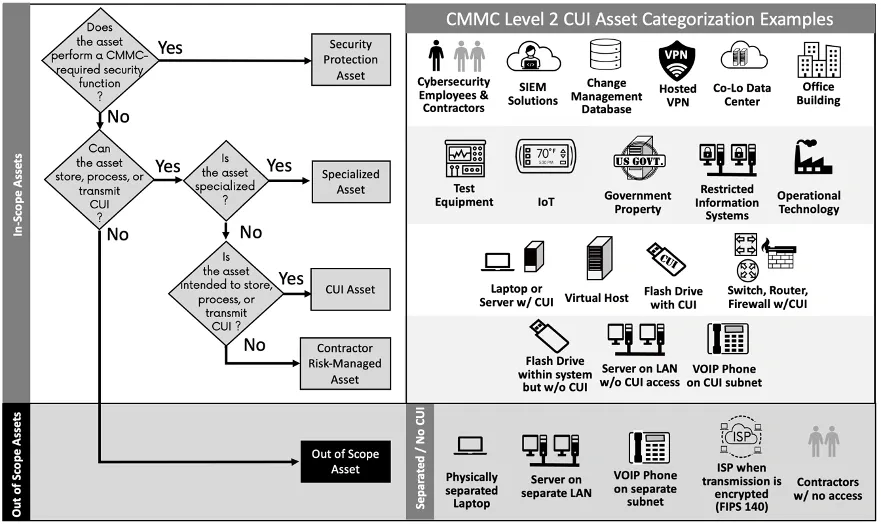
Image Source: LinkedIn
Your CMMC implementation starts with the right asset categorization. The Department of Defense’s specific asset categories are 5 years old. These categories help determine which systems need assessment and what security controls apply to different parts of your environment.
CUI Assets: Systems that store, process, or transmit CUI
CMMC Level 2 mainly focuses on protecting assets that handle Controlled Unclassified Information. The official guidance defines CUI Assets as systems that:
- Process CUI – Assets that access, enter, edit, generate, manipulate, or print sensitive information
- Store CUI – Assets where information stays inactive or at rest (electronic media, memory, or physical documents)
- Transmit CUI – Assets that transfer information between systems using physical or digital methods
Your asset inventory must list CUI Assets. You need to mark them clearly in your System Security Plan (SSP) and show them in your network diagram. These assets must meet all 110 CMMC Level 2 security requirements from NIST SP 800-171.
Security Protection Assets: Supporting security infrastructure
Security Protection Assets (SPAs) provide security functions within your assessment scope, whatever their direct involvement with CUI. These assets play a vital role in compliance even if they never handle CUI.
Common examples are firewalls, Security Information and Event Management (SIEM) tools, Endpoint Detection and Response (EDR) solutions, and Multi-Factor Authentication (MFA) systems. Assessors will review SPAs against all relevant CMMC Level 2 security requirements based on their specific functions.
Contractor Risk Managed Assets: Policy-restricted systems
Contractor Risk Managed Assets (CRMAs) can handle CUI but don’t because of your security policies and practices. Unlike physically separate systems, CRMAs usually share network space with CUI Assets but face policy restrictions.
CRMAs stay within your assessment scope but need less scrutiny. Assessors won’t check these assets against all security requirements if your policies clearly prevent CUI access. They might run limited checks if your documentation raises questions.
Specialized Assets: GFE, IoT, OT, and test devices
Some systems might handle CUI but can’t meet standard security methods due to their limitations. These Specialized Assets include:
- Government Furnished Equipment (GFE) – Government-owned hardware with strict modification limits
- Internet of Things (IoT)/Industrial IoT – Connected devices with sensors and limited security features
- Operational Technology (OT) – Systems that control physical environments like industrial controls or building management
- Restricted Information Systems – Systems built to government specifications
- Test Equipment – Hardware used for testing deliverables
Your SSP should document Specialized Assets, and assessors will review them with their technical limits in mind.
Out-of-Scope Assets: Logical and physical separation
Out-of-Scope Assets can’t handle CUI or protect CUI Assets. Physical or logical boundaries must completely separate these assets from your CUI environment.
Assets that fit any in-scope category can’t be out-of-scope. You’ll need to explain why these systems can’t access CUI during assessment, but they won’t face further evaluation.
The right categorization affects your assessment scope and costs directly. Wrong categories can waste resources through over-scoping or lead to assessment failure through under-scoping. A clear understanding of these roles helps you document your System Security Plan accurately and get ready for CMMC assessment effectively.
Scoping People, Technology, and Facilities
Your CMMC assessment scope needs more than just asset categories. You must identify three vital components: the people, technology, and facilities that work with CUI. The way you define these elements sets your compliance boundary and affects your implementation costs.
People: Internal and external personnel handling CUI
Anyone who works with Controlled Unclassified Information in your organization falls under personnel scoping. This includes your employees, contractors, vendors, and external service providers who handle CUI as part of their duties. Level 2 assessments require personnel to spot and report security threats. They must understand activity risks and follow relevant policies.
Your scoping boundaries should account for these personnel groups:
- Internal staff with direct CUI access
- External contractors supporting CUI-related projects
- Vendor representatives with system access
- Technical support personnel maintaining security infrastructure
People rather than technology are the focus of many CMMC requirements. We focused on human aspects in controls like non-privileged accounts for non-security functions, security awareness training, and personnel screening.
Technology: On-premise and cloud-based systems
Your technology scope should identify all hardware and software that handles CUI or provides security functions. The list covers servers, client computers, mobile devices, network appliances (firewalls, switches, routers), VoIP devices, applications, virtual machines, and database systems.
Your technology inventory needs a complete record of on-premise infrastructure and cloud resources. Data flows and connections between components should appear in your mapping. You need clear definitions of physical boundaries like VLANs, security zones, and network segmentation to establish scope limits.
Cloud environments need extra documentation to show they match or exceed FedRAMP Moderate standards. You should understand how responsibilities are shared between your organization and the cloud service provider.
Facilities: Data centers, offices, and SOCs
Physical locations that process, store, or transmit CUI become part of your CMMC scope. Your assessment should include physical office locations, satellite offices, server rooms, datacenters, manufacturing plants, and secured rooms.
To name just one example, see a Security Operations Center (SOC) that monitors your CUI environment. It becomes a Security Protection Asset even without direct CUI handling. A co-located data center with your servers needs proper documentation in your System Security Plan.
Your scoping process should now include detailed data flow diagrams that show CUI movement between people, technology, and facilities. These visual aids help identify security boundaries and serve as vital evidence during assessment.
External Service Providers and Cloud Compliance
Defense contractors often depend on external providers to handle parts of their IT infrastructure. You need to know how these relationships affect your CMMC compliance to scope your project correctly.
CSPs and FedRAMP Moderate equivalency requirements
Cloud Service Providers (CSPs) that handle Controlled Unclassified Information must meet FedRAMP Moderate authorization or equivalency requirements. DFARS 252.204-7012 has required this since 2017, and now it’s part of CMMC assessment scope.
A CSP needs to show 100% compliance with the FedRAMP Moderate security control baseline through an assessment by a FedRAMP-recognized Third Party Assessment Organization (3PAO). The 3PAO must verify all Plans of Action and Milestones (POA&Ms) are closed.
CSPs should give contractors a detailed Body of Evidence with:
- System Security Plan (SSP)
- Security Assessment Plan (SAP)
- Security Assessment Report (SAR)
- Information System Contingency Plan
Google Workspace, Microsoft GCC High, Amazon GovCloud, and Azure Government are among popular FedRAMP-certified solutions. Some services like PreVeil have achieved FedRAMP Moderate Equivalency status without full FedRAMP certification.
ESP categorization and CMMC scope effects
External Service Providers (ESPs) are “external people, technology, or facilities that an organization uses to provide and manage detailed IT and cybersecurity services”. An ESP under CMMC must process, store, or transmit CUI or Security Protection Data on their assets.
Requirements change based on ESP categories:
- CSPs handling CUI must meet FedRAMP requirements
- Non-CSP ESPs handling CUI must be part of the organization’s assessment scope
- ESPs handling Security Protection Data need assessment as Security Protection Assets
- Service providers not dealing with CUI or Security Protection Data don’t count as ESPs for CMMC
Managed SIEM services, vulnerability scanning providers, incident response teams, and infrastructure services that handle configuration information are examples of in-scope ESPs.
Shared Responsibility Matrix (SRM) for cloud services
A Shared Responsibility Matrix shows which security requirements belong to your organization and which belong to service providers. Your organization can’t simply inherit compliance from providers – documentation matters.
Your CSP’s Customer Responsibility Matrix (CRM) lists responsibilities for each CMMC control objective. These responsibilities fall into three groups:
- Common Controls: Shared between you and the provider
- Inherited Controls: Fully managed by the provider
- System-Specific Controls: Your responsibility alone
The System Security Plan must include the SRM along with details about ESP relationships and services. This matrix assigns owners to every assessment objective and prevents compliance gaps during assessment.
Note that using a FedRAMP-authorized provider doesn’t guarantee CMMC compliance. You still need to implement and maintain many controls, including documentation reviews, user access management, and security assessments.
Control Applicability and Implementation Approaches
You need to understand control categorization to figure out which CMMC requirements apply to your environment. The CMMC 2.0 framework has 110 security practices spread across 14 control families that will determine how you protect your organization.
System (S), Organization (O), and Combination (O/S) control types
CMMC controls come in three different implementation categories that shape their application:
- Organization (O) controls focus on enterprise-wide policies, procedures, and processes that guide your entire operation. These controls apply to all personnel, whatever the system boundaries.
- System (S) controls deal with technical implementations in your CUI environment. These controls cover configuration needs, system-specific settings, and technical safeguards for particular assets.
- Combination (O/S) controls need both organizational governance and system-specific implementations to work together for compliance.
Using NIST SP 800-53B to determine control applicability
NIST SP 800-53B is a vital reference that helps determine control applicability in your environment. CMMC 2.0 Level 2 includes 110 controls from NIST SP 800-171. You need to look at how these controls align with NIST SP 800-53B guidance to understand their application.
This standard helps you figure out:
- Which components need specific controls
- How thoroughly controls should be implemented
- Who should handle the implementation
Examples of control allocation to people, tech, and facilities
The right allocation makes sure each control applies to the right components:
People-focused controls: Access Control (AC) requirements mostly deal with personnel policies. Users should use non-privileged accounts for non-security functions and complete security awareness training.
Technology-focused controls: Configuration Management (CM) controls affect systems through baseline configurations and security impact analyzes.
Facility-focused controls: Physical Protection (PE) requirements cover facilities through visitor management and physical access restrictions.
Many controls overlap these categories. Identification & Authentication (IA) requirements affect both people policies and system configurations. Only when we are willing to see these relationships can we create a solid implementation plan that covers all 110 CMMC Level 2 requirements effectively.
Using DISA STIGs and SRGs to Support Scoping
DISA offers tools that make your CMMC scoping process easier. These resources work with your asset categorization and help ensure technical compliance in your environment.
Mapping DISA STIGs to CMMC controls
DISA Security Technical Implementation Guides (STIGs) connect directly to NIST SP 800-53 security controls. This creates a natural path to CMMC compliance. Your systems will meet NIST SP 800-171 and CMMC requirements when you implement STIG settings. STIGs cover many CMMC domains like access control, identification and authentication, audit and accountability, and configuration management. Requirement CM.2.065 calls for “established security configuration settings” – exactly what STIGs deliver.
Creating an applicability matrix for technical components
Your CMMC applicability matrix starts by connecting SP 800-53 to SP 800-171A objectives. This helps organizations:
- Define and group components within assessment boundaries
- Pick the right STIGs/SRGs based on what components can do
- Add proper guidance for installed applications
Most teams use a Power Query Pivot table that shows assessment objectives lined up with DISA guidance. This tool helps organizations use DISA’s detailed implementation steps and testing methods quickly.
Limitations of STIG/SRG guidance for cloud environments
STIGs come with two main drawbacks. Cloud Service Providers must create their own Shared Responsibility Matrix that shows which requirements fall to the customer. DISA guidance also focuses on component settings but might not cover all technical features beyond the STIG or SRG description. IaaS/PaaS environments particularly need clear security responsibility boundaries between provider and customer.
Conclusion
A clear understanding of your assessment scope is crucial to prepare for CMMC compliance. Your security controls implementation starts with proper asset categorization. A well-defined boundary around your CUI assets, security protection assets, and contractor risk managed assets will prevent things from getting pricey. This approach ensures sensitive information stays protected.
Your System Security Plan must document all people, technology, and facilities that work with CUI. Assessment evidence comes from this documentation and data flow diagrams. You just need to pay close attention to external service providers. This becomes especially important when you have cloud services that must meet FedRAMP Moderate equivalency standards.
Your control implementation success depends on knowing which practices apply to your organization versus specific systems. DISA STIGs are a great way to get configuration guidance that aligns with many CMMC requirements. The guidance varies based on environment types. These technical guides don’t deal very well with all 110 security practices needed for Level 2 certification.
Defense contractors must move quickly to set proper scope boundaries before the November 2025 deadline. Many organizations find this process difficult and could use expert help. We suggest you Book a Readiness Call to learn about where you stand against CMMC requirements. The right scoping helps with compliance and makes the best use of your resources. This ensures your cybersecurity investments protect what matters most while you keep competitive defense contract opportunities.
Key Takeaways
Understanding CMMC scoping fundamentals is critical for defense contractors facing the November 2025 compliance deadline. Here are the essential insights for successfully preparing your environment:
• Categorize assets correctly to control costs – Properly classify CUI assets, Security Protection Assets, and Contractor Risk Managed Assets to avoid expensive over-scoping of your entire network.
• Document people, technology, and facilities comprehensively – Create detailed inventories and data flow diagrams showing how CUI moves through your organization to establish clear assessment boundaries.
• Ensure cloud providers meet FedRAMP Moderate requirements – Verify your Cloud Service Providers have proper authorization and understand your shared responsibility matrix for security controls.
• Map DISA STIGs to streamline technical compliance – Leverage Security Technical Implementation Guides to configure systems that simultaneously meet NIST SP 800-171 and CMMC requirements.
• Act immediately with expert guidance – With the tight November 2025 deadline, organizations should assess their current posture and establish proper scope boundaries to maintain defense contract eligibility.
Accurate scoping forms the foundation of cost-effective CMMC compliance. Without proper boundaries, organizations risk either failing assessment due to under-scoping or facing prohibitive costs from over-scoping their entire business infrastructure.
FAQs
Q1. What is CMMC and why is it important for defense contractors? CMMC (Cybersecurity Maturity Model Certification) is a framework that ensures defense contractors protect sensitive information. It’s crucial because it’s now mandatory for companies working with the Department of Defense, with a compliance deadline of November 10, 2025.
Q2. How do I determine which assets fall within CMMC assessment scope? Assets are categorized based on their interaction with Controlled Unclassified Information (CUI). This includes CUI Assets, Security Protection Assets, Contractor Risk Managed Assets, and Specialized Assets. Proper categorization is essential for efficient compliance and cost management.
Q3. What are the requirements for cloud service providers under CMMC? Cloud Service Providers handling CUI must meet FedRAMP Moderate authorization or equivalency requirements. This involves demonstrating compliance with the FedRAMP Moderate security control baseline and providing a comprehensive Body of Evidence to contractors.
Q4. How do DISA STIGs relate to CMMC compliance? DISA Security Technical Implementation Guides (STIGs) map directly to many CMMC controls. Implementing STIG settings on your systems can help configure them to meet NIST SP 800-171 and CMMC requirements, streamlining the compliance process.
Q5. What should organizations do to prepare for CMMC assessment? Organizations should start by accurately categorizing their assets, documenting people, technology, and facilities that interact with CUI, ensuring cloud providers meet requirements, and leveraging DISA STIGs for technical compliance. Given the 2025 deadline, it’s advisable to seek expert guidance and assess current posture against CMMC requirements promptly.