Validated Findings, Risk-Based Priority and Audit-Ready Evidence
Scanners produce thousands of alerts. Almost none of them are the thing that gets you breached, and separating the two is where security teams lose their week. VMaaS combines scanning with analyst validation, risk-based prioritization, remediation tracking and independent verification that the fix actually worked. And the timing matters: FedRAMP’s VDR and VER rules become mandatory on 7 December 2026, and legacy monthly scanning alone no longer satisfies them.
2026 · UPDATE
Why validation and cadence now matter more

FedRAMP VDR and VER become mandatory on 7 December 2026
The vulnerability detection and response rules apply to all FedRAMP certifications, pulled forward from June 2027 to align with CISA Binding Operational Directive 26-04. Legacy monthly scanning is no longer sufficient on its own, and the grace period ends 7 March 2027 with revocation following.

PCI DSS now requires authenticated internal scanning
Under v4.0.1, internal vulnerability scans must be authenticated. Unauthenticated black box scanning of internal networks no longer satisfies the requirement, which changes both the tooling and the credential management around it.

The GLBA Safeguards Rule sets a semi-annual floor
Covered non-bank financial institutions must conduct semi-annual vulnerability assessments and annual penetration testing, or implement continuous monitoring achieving comparable outcomes. It is among the most consistently missed obligations in the Rule.

Scanning is not the requirement, closure is
Frameworks increasingly ask for evidence that a finding was remediated and the fix verified, not that it was identified and ticketed. PCI DSS 11.4.4 makes retesting explicit. Independent verification is the part most programmes cannot produce.
WHAT VMAAS IS
A managed programme, not a scanner subscription
Vulnerability Management as a Service continuously identifies vulnerabilities, validates what is real, and prioritizes remediation by risk, so teams focus on exposures that genuinely threaten the business rather than on everything a scanner flagged.
The definition that matters operationally: scanning, plus human analyst validation, plus risk-based prioritization, plus remediation tracking and verification. Remove any one of those four and what remains is a tool with an invoice attached.
TWO SERVICE MODELS
Snapshot or Watch
Choose Snapshot for a baseline or a time-bound deliverable such as an audit, a launch or third-party diligence. Choose Watch for an ongoing programme with cadence, alerts, trending and lifecycle management.
Snapshot
ONE-TIME ASSESSMENT
Built for audit responses, pre-launch checks, third-party due diligence, post-incident hygiene verification and annual or semi-annual compliance needs. Delivered on your timeline with prioritized findings and executive-ready reporting.
WATCH
ONGOING MANAGEMENT
Continuous vulnerability management for evolving environments, with ongoing evidence, real-time alerts, trend metrics and human oversight across scheduled scans and quarterly reviews.
Detect
STAGE 1
Scanning across on-premises, cloud and public-facing applications to establish baseline inventory and evidence.
Validate
STAGE 2
Non-destructive Extended Validation to reduce false positives and add business context, so the priority list reflects reality.
Challenge
STAGE 3
Penetration testing where authorized, demonstrating real-world impact through controlled attacker simulation rather than theoretical severity.
Mitigate and manage
STAGE 4 AND 5
Patch enablement workflows and reporting to accelerate remediation, then ongoing prioritization by exploit likelihood and business criticality with validated findings tracked to closure.
Five stages
THE EXPOSURE TO ASSURANCE PATH
The structure turns vulnerability data into outcomes that support both security and compliance goals, rather than into a report nobody sequences.
Snapshot deliverables
External and internal scanning, credentialed or uncredentialed as scoped. Baseline asset inventory documenting discovered assets. Analyst validation confirming high and critical findings. Prioritized technical report with remediation guidance and business context. Executive summary with leadership-ready metrics and a remediation roadmap. Compliance evidence package tailored to your regulatory requirements.
Watch ongoing management
Configured scan cadence monthly, quarterly or continuous across internal and external schedules. Priority alerts on critical and high public exposures and significant internal findings. Dashboards and trending for posture visibility and historical analysis. Quarterly analyst-led reviews. Vulnerability workflow covering lifecycle management, recheck validation and false-positive resolution. Continuous analyst review with stakeholder escalation. Optional integrations with ticketing, CI/CD and SIEM.
Extended Validation
Analyst-led manual checks that confirm what is real, reduce false positives and add business context. Watch capacity markers: up to 10 high or critical items validated per quarter, up to 8 hours validation effort per quarter, 1 critical external vulnerability validated per month, validation completed within 2 weeks of detection.
Penetration testing
Controlled attacker simulation under agreed rules of engagement, including chained exploit scenarios and retesting for remediation verification. Watch annual markers: 1 comprehensive annual penetration test, retesting within 60 days, chained exploit scenarios showing attack paths, and a detailed report with business impact analysis.
Coverage options
External website monitoring per domain. Web application security per application, covering business logic and authentication testing. Active Directory and Entra identity infrastructure security across users, groups, GPOs, OUs and password expiry visibility. Cloud service provider scanning or integration for Microsoft 365 and Google Workspace. PII scanning, Watch only, agent-based sensitive data discovery.
Deployment inputs
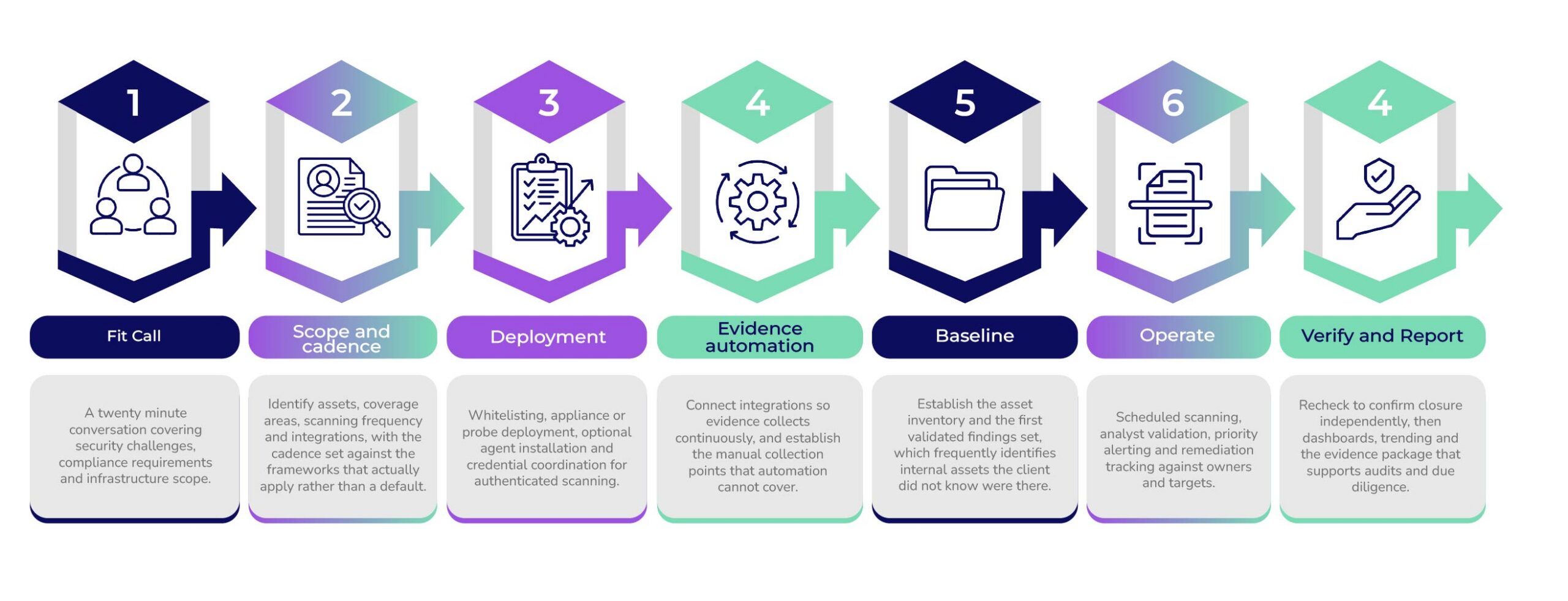
Whitelisting for external scanner IPs, virtual appliance or probe deployment, optional agents for endpoint coverage, credentials and test accounts for authenticated scans including MFA and SSO coordination, and authorization documentation for Extended Validation and penetration testing activity.
ENGAGEMENT PHASES
How the Work Runs
WHO THIS IS FOR
Roles Elevate works with on this Standard
+ IT operations and infrastructure
+ CISOs and security leads
+ Compliance and GRC officers
+ FedRAMP certified providers
+ Financial institutions under the Safeguards Rule
+ Merchants and service providers under PCI
GET STARTED
Ready to reduce real-world exposure?
Whether you need a one-time baseline or ongoing oversight, Elevate validates what is real, prioritizes what matters, verifies that fixes held, and produces the evidence your auditors and your board both ask for.
FAQ
Common Questions
🡪 What is Vulnerability Management as a Service?
A managed vulnerability programme combining scanning, analyst validation, risk-based prioritization, remediation tracking and verification, to reduce real-world exposure rather than to produce a longer list of findings.
🡪 What is the difference between Snapshot and Watch?
Snapshot is a one-time assessment for audits, launches, due diligence or post-incident verification. Watch is ongoing monitoring with cadence, alerts, dashboards, quarterly analyst reviews and workflow management. Choose Snapshot for a time-bound deliverable and Watch for a programme.
🡪 Do you validate findings or just forward scanner results?
Findings are reviewed by analysts, and Extended Validation adds deeper manual verification to reduce false positives and confirm true risk. Raw scanner output is not a deliverable, because it shifts the triage work back to the team that outsourced it.
🡪 Can you verify that remediation actually worked?
Yes, and independently. Rechecks confirm closure so teams can prove a vulnerability is closed rather than assumed closed. That distinction matters under frameworks such as PCI DSS, where 11.4.4 requires exploitable findings to be corrected and retested, and an assessor asks for evidence of the verification.
🡪 Does this satisfy our compliance scanning requirements?
It depends on which framework applies and how the programme is scoped. PCI DSS v4.0.1 requires authenticated internal scanning and separates scanning at 11.3 from penetration testing at 11.4. The GLBA Safeguards Rule requires semi-annual vulnerability assessments and annual penetration testing. FedRAMP’s VDR and VER rules become mandatory on 7 December 2026 and legacy monthly scanning no longer suffices alone. Scoping against every applicable requirement before deployment is what makes one programme answer several.
🡪 What do you need from us to start?
Whitelisting for external scanner IPs, deployment of virtual appliances or probes, optional agents for endpoint coverage, credentials or test accounts for authenticated scans including MFA and SSO coordination, and authorization documentation where Extended Validation or penetration testing is in scope.