FedRAMP VDR compliance that never leaves your boundary
On December 7, every finding in your FedRAMP offering needs an exploitability call, a reachability call, an agency impact rating and a deadline, reported to your agencies in JSON. Elevate VDR does that work inside your own environment, across every scanner you run, with Elevate advisors on the calls a machine should not make alone.
- Runs inside your boundary
- Rev5 and 20x, Classes A to D
- Any scanner, any export
Every finding, every deadline, one screen
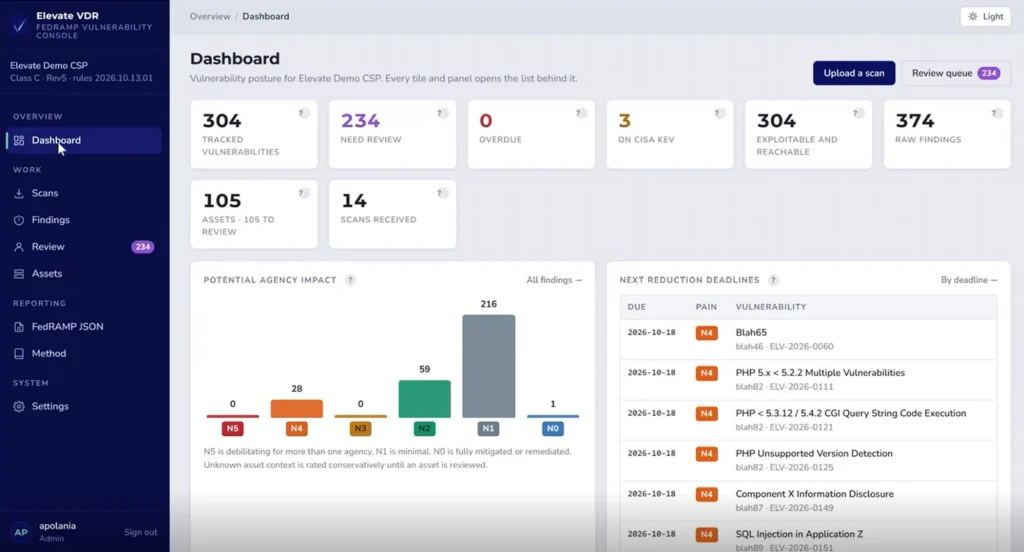
Open Elevate VDR and you see where your VDR program stands today: what is tracked, what waits for a decision, what is overdue and which deadline expires next. Every tile opens the list behind it, so the dashboard is where the day’s work starts, not a report you read once a month.
Duplicates collapse
Raw findings from every scanner become one tracked vulnerability per weakness per asset. You fix a list, not a pile.
Decisions surface
“Need review” counts the ratings the engine will not sign off alone, so your team spends its time on judgment calls, not data entry.
Agency impact, at a glance
Every finding sits on the N5 to N0 scale your agencies will read in the reports, so you see the risk the way they will.
The next clock to expire
Next reduction deadlines lists what must be fixed first, with its rating and tracking ID, before anything turns overdue.
Your vulnerability data never leaves your boundary
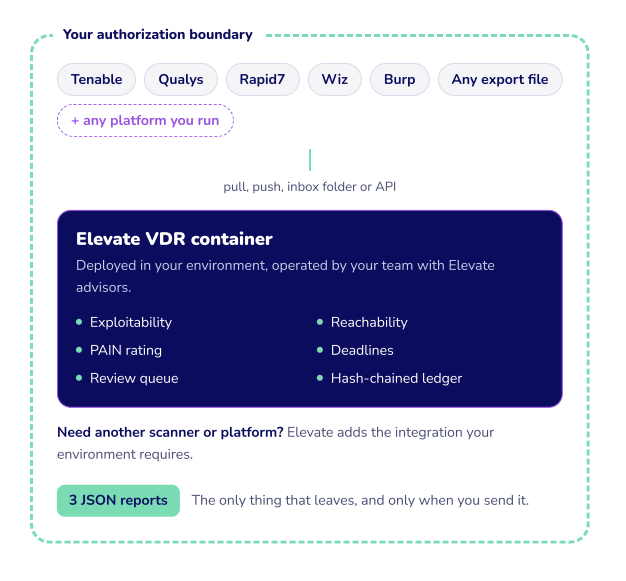
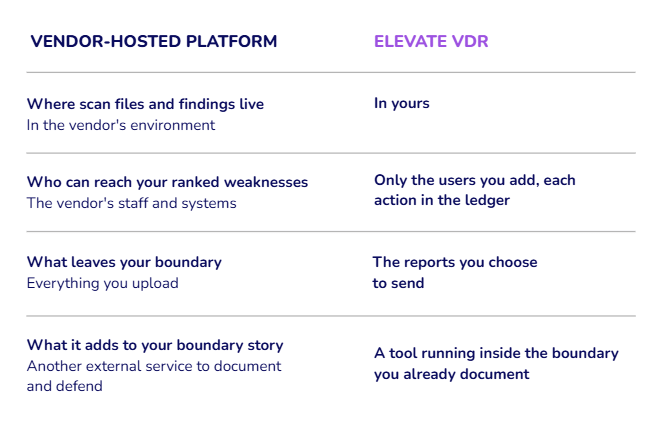
A VDR program holds the most sensitive list your company owns: every weakness in your FedRAMP system, ranked by how easy it is to exploit. Elevate VDR runs as a container inside your authorization boundary, so that list stays where your controls, your logging and your authorization already are.
Keep the backlog private
Exploitable, reachable findings are exactly what an attacker wants. They never sit in a shared, multi-tenant database.
Keep your assessor’s story simple
The tool sits inside the system your Independent Assessor already reviews, with its own evidence trail.
Keep your scanner choices
Use the scanners you have. If your environment needs another platform, the integration gets built around you.
See it running inside an environment like yours
Pilot spots are limited while the first programs go live.
Stop chasing findings. Start meeting deadlines.
After December 7, a scan result is no longer a line in a spreadsheet. It is a rating, a deadline and an entry in a report your agencies read.
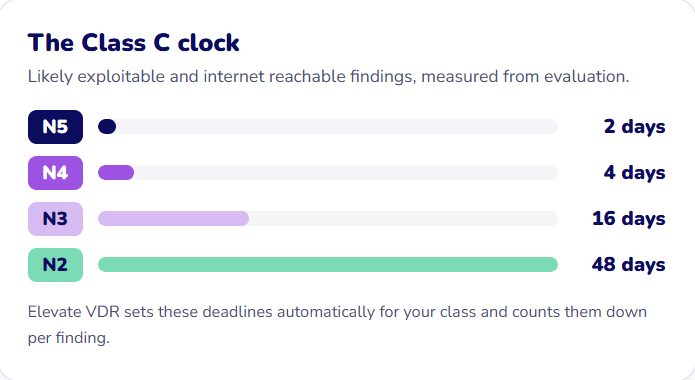
Five days to evaluate
At Class C, every new finding needs its exploitability, reachability and impact call within 5 days of detection. Across several scanners, that is a daily job, not a quarterly one.
Exploitable is the default
FedRAMP assumes a finding can be exploited. Calling it “not likely exploitable” takes a written justification that appears in your report.
Overdue is visible
Each finding carries its reduce-by date into the JSON. Miss it and your agencies see it flagged.
Find out how many of your findings are already on a clock
Bring your scanner exports. Leave with a rated backlog.
From scanner exports to FedRAMP reports in four steps
After December 7, a scan result is no longer a line in a spreadsheet. It is a rating, a deadline and an entry in a report your agencies read.
Bring in every scan
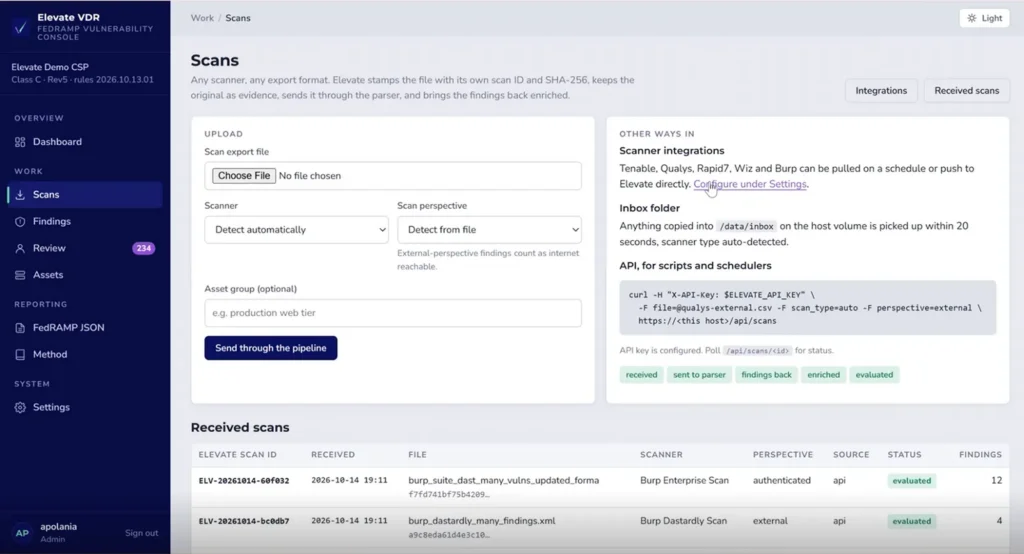
Upload any export, connect Tenable, Qualys, Rapid7, Wiz or Burp on a schedule or by push, or drop files in an inbox folder. Each file gets its own scan ID and SHA-256 hash, and the original stays as evidence.
External-perspective scans mark their findings as internet reachable automatically.
Rate every finding the FedRAMP way
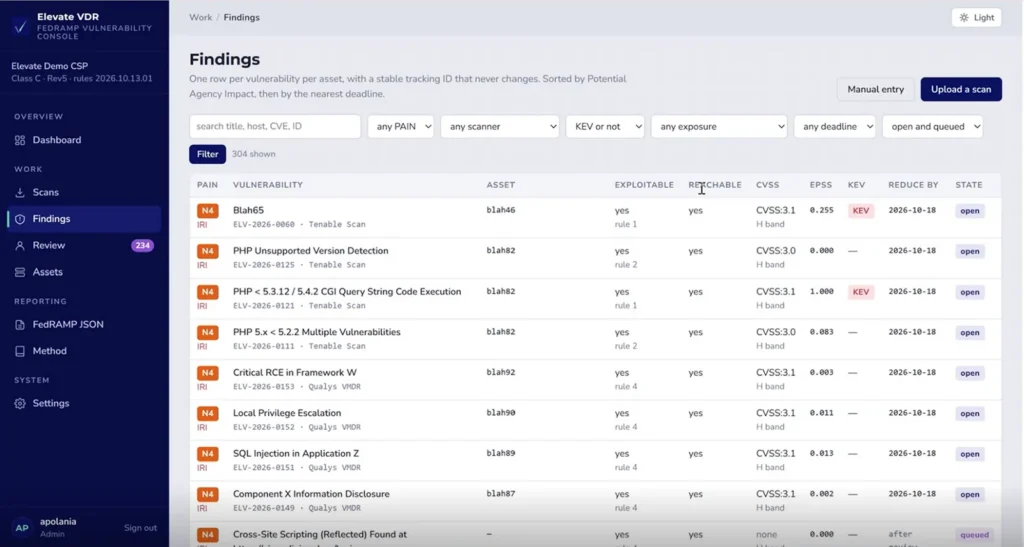
Duplicates across scanners merge into one row per vulnerability per asset, with a tracking ID that never changes. Each finding is checked against CISA KEV, EPSS and CVSS, rated N5 to N1 and given its reduce-by date for your class.
Review what the engine will not sign off alone
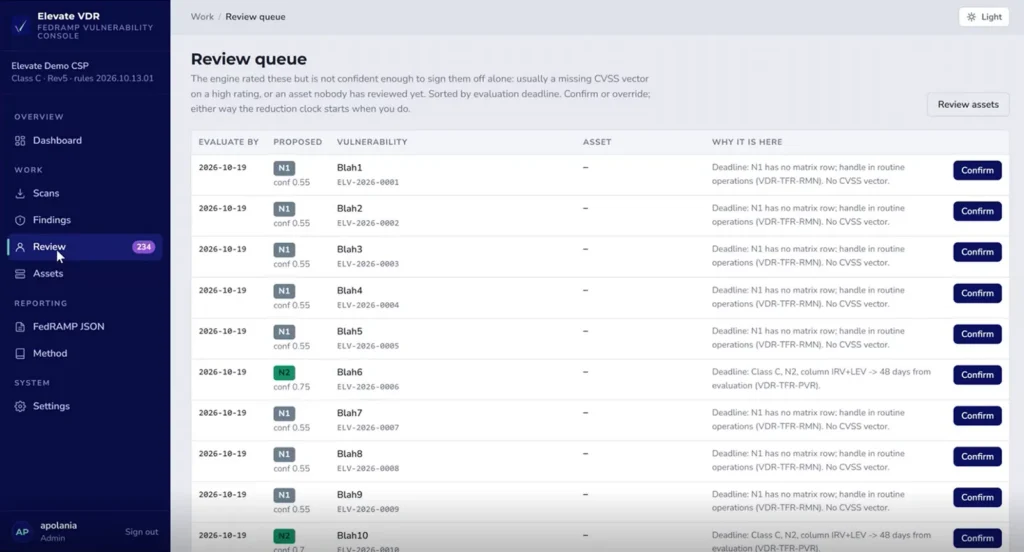
When a rating rests on thin data, such as a missing CVSS vector or an asset nobody has reviewed, the engine says so. It shows its confidence and the rule behind the proposed deadline. Your team confirms or overrides, with Elevate advisors alongside, and the clock starts when you do.
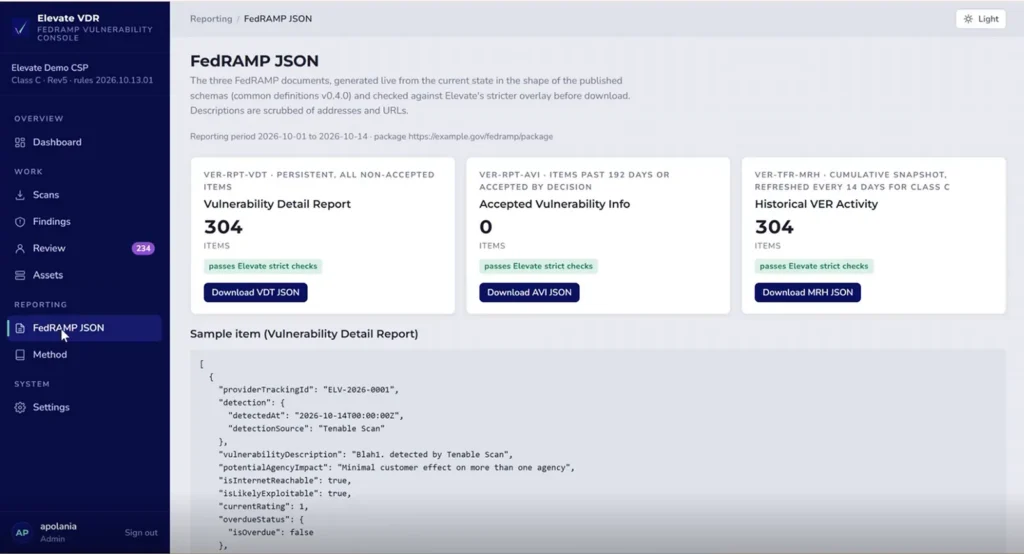
Generate the three FedRAMP reports
- Vulnerability Detail Report: every non-accepted item.
- Accepted Vulnerability Info: items past 192 days or accepted by decision.
- Historical VER Activity: the cumulative snapshot, refreshed every 14 days for Class
Each file is built from live data, shaped to FedRAMP’s published schemas and checked against strict rules before download.
Watch your own scans go through all four steps
A guided pilot on your exports, inside your environment.
Ready for the Independent Assessor's questions
Your assessor will ask how each rating was reached and who changed what. Elevate VDR answers both on screen
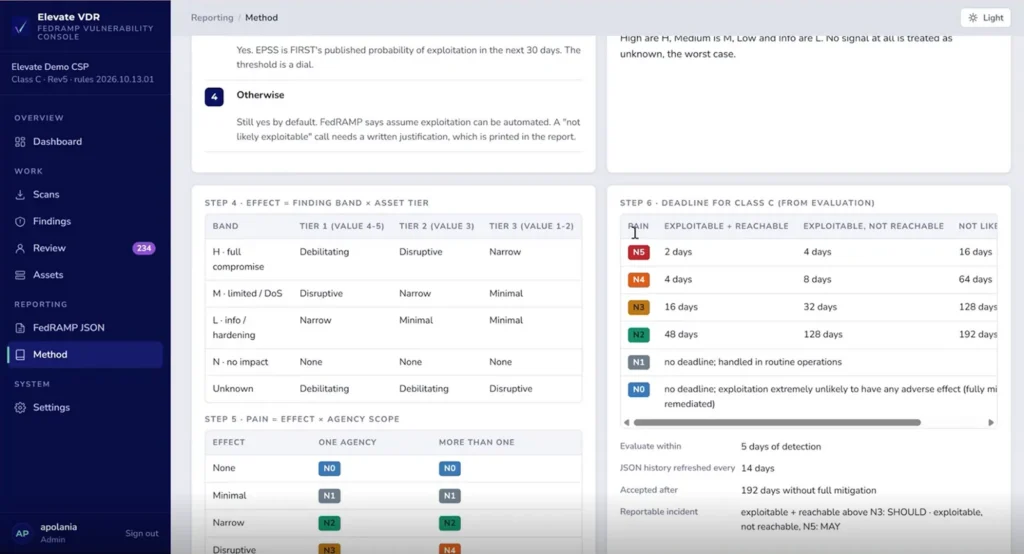
The method, in the open
Every step from finding band to PAIN rating to deadline is laid out as a matrix your assessor can follow. A “not likely exploitable” call carries its written justification into the report.
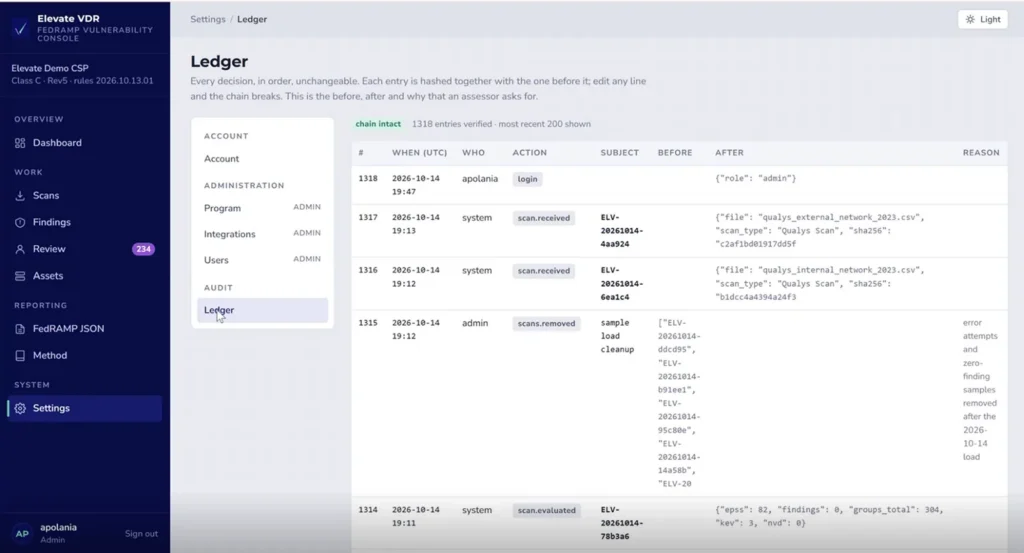
A ledger that cannot be quietly edited
Every decision is recorded in order with its before, after and reason. Each entry is hashed with the one before it, so editing any line breaks the chain.
Software for the volume. Advisors for the judgment calls.
Elevate advisors set up your program, review the ratings the engine flags and prepare the evidence your Independent Assessor will ask for. Elevate prepares you for the assessment; the assessor performs it.
18+
500+
100%
Start your VDR program before the rules start it for you
Run Elevate VDR on your own scan exports, inside your own boundary, and see how many findings need a rating, a review or a fix before December 7
FAQ
FedRAMP VDR questions
What is FedRAMP VDR?
VDR, Vulnerability Detection and Response, is the FedRAMP rule set for finding, evaluating and fixing vulnerabilities. Each finding is judged on whether it is likely exploitable and internet reachable, given a potential agency impact rating from N5 to N1, and fixed within a timeframe set by that rating and the offering’s class. Results go to agencies in machine-readable form.
When do VDR and VER apply?
They apply to every FedRAMP offering on December 7, 2026, and the grace period ends March 7, 2027. Rev5 and 20x offerings are both in scope. Starting before the deadline gives your reports a history of evaluations instead of a first snapshot.
Where does my vulnerability data go?
It stays in your environment. Elevate VDR runs as a container inside your boundary, and the original scan files are kept there as evidence. Only the reports you choose to send leave it.
Does it work with the scanners and platforms we already use?
Yes. Tenable, Qualys, Rapid7, Wiz and Burp connect today, and any export file can be uploaded. If your environment depends on another platform, Elevate builds that integration. Your scanners keep doing detection.
Is Elevate the assessor?
No. Elevate prepares cloud providers for FedRAMP assessments performed by an Independent Assessor. Elevate VDR and Elevate advisors help you build a program and evidence the assessor can follow. Talk to an advisor about where your program stands.