
CMMC controls include 14 distinct cybersecurity domains and 141 specific security practices that defense contractors must implement. CEOs in the Defense Industrial Base (DIB) need to understand these requirements clearly. Their business survival depends on it, not just compliance.
The Department of Defense (DoD) created the Cybersecurity Maturity Model Certification (CMMC) framework to improve the cybersecurity requirements in the Defense Federal Acquisition Regulation Supplement. DoD’s measurable standards apply to all corporations working with the federal government.
The standards follow three progressive levels from simple cybersecurity hygiene (Level 1) to very high maturity (Level 3). Your organization’s risk level determines the security requirements at each level. The DoD’s main goal aims to protect Controlled Unclassified Information (CUI) by standardizing cybersecurity practices across the defense supply chain.
This piece will get into each of the 14 CMMC domains. We’ll start with Access Control’s 25 controls and move to System and Information Integrity’s 13 controls. You’ll learn how these domains work at different CMMC levels, which will help you prioritize cybersecurity investments and secure future DoD business.
Why CEOs Must Understand the 14 CMMC Control Families
Defense contractors must understand the 14 CMMC control families to stay in business. Malicious cyber activity costs the U.S. economy between $57 billion and $109 billion annually. CEOs need to recognize these cybersecurity domains as crucial to their operations.
The Business Risk of Non-Compliance
Non-compliance comes with steep financial consequences. MORSE Corporation paid $4.6 million to settle False Claims Act violations after failing to meet cybersecurity standards in their Army and Air Force contracts. A major university had to pay $1.25 million because they falsely claimed NIST 800-171 compliance.
The stakes go beyond just paying fines. Companies face contract termination, delayed payments, and might become ineligible for DoD contracts completely. The Department of Defense makes it clear – security comes first and won’t take a back seat to cost, schedule, or performance.
Legal risks have grown lately, with three False Claims Act cases targeting premature or false compliance claims. Security lapses from non-compliance could drive up insurance premiums or even void coverage.
CMMC as a Competitive Advantage
Smart CEOs see CMMC as more than just another compliance box to check. Getting CMMC certified shows your dedication to protecting sensitive information, which builds trust with customers, investors, and government stakeholders.
You can’t compete in the defense marketplace without CMMC compliance anymore – it’s now just the price of admission. Companies without proper certification might lose major revenue opportunities or end up stuck in lower-tier subcontracting roles.
Getting certified early gives you the edge. Mid-size firms that get Level 2 certification quickly can tap into sole-source and limited-competition contracts while others get stuck in lengthy reviews. Being ready also helps you line up with other cybersecurity rules, which makes the whole compliance process smoother across different frameworks.
CMMC and NIST 800-171: How They Work Together
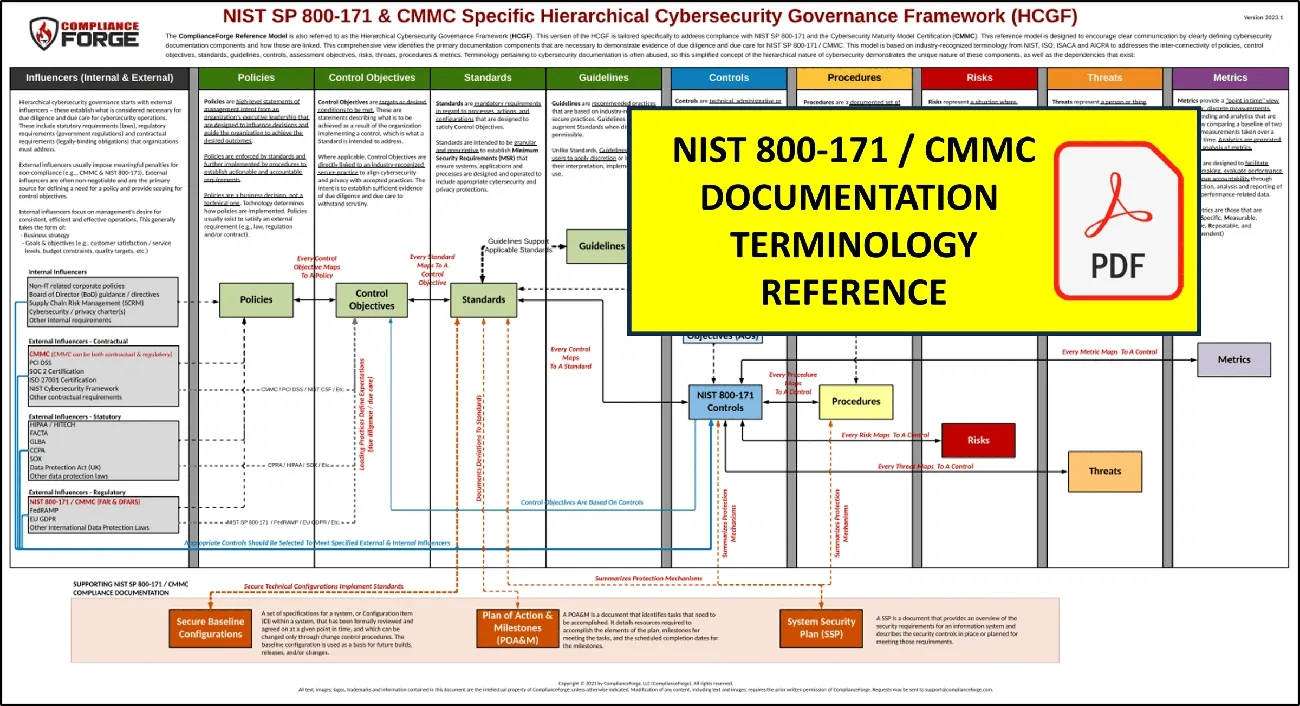
Image Source: ComplianceForge
NIST 800-171 and CMMC are the foundations of the Department of Defense’s cybersecurity compliance framework. These standards work together rather than compete to protect sensitive information.
Mapping NIST 800-171 to CMMC Controls
NIST 800-171 sets security requirements as the foundation, while CMMC verifies their implementation. This key difference explains why the DoD developed CMMC—systemic problems with NIST standards compliance across the Defense Industrial Base needed addressing.
A clear and effective mapping connects these frameworks. CMMC Level 2 lines up with all 110 security requirements from NIST 800-171 Rev 2. The requirements span 14 domains that match the NIST 800-171 families:
- Access Control
- Awareness and Training
- Audit and Accountability
- Configuration Management
- Identification and Authentication
- Incident Response
- Maintenance
Seven more domains cover everything from media protection to system integrity. Contractors who implement NIST 800-171 make progress toward CMMC Level 2 certification simultaneously.
Understanding the 110 CMMC Controls
Level 2 CMMC controls protect Controlled Unclassified Information (CUI) throughout its lifecycle. CMMC adds formal verification through self-assessment or third-party certification based on contract requirements, while NIST 800-171 relies on self-assessment.
These controls create a practical roadmap to cybersecurity maturity. Contractors who handle CUI must meet all 110 requirements across the 14 security domains. Organizations seeking CMMC Level 3 certification need to become skilled at these 110 practices before tackling 24 additional controls from NIST 800-172 for advanced threat protection.
The assessment methods between frameworks show a clear contrast. NIST permits self-assessment with SPRS score coverage, while CMMC uses a dual approach—self-assessment for non-prioritized contracts and third-party C3PAO assessment for prioritized ones.
Access Control: Limiting Access to What Matters
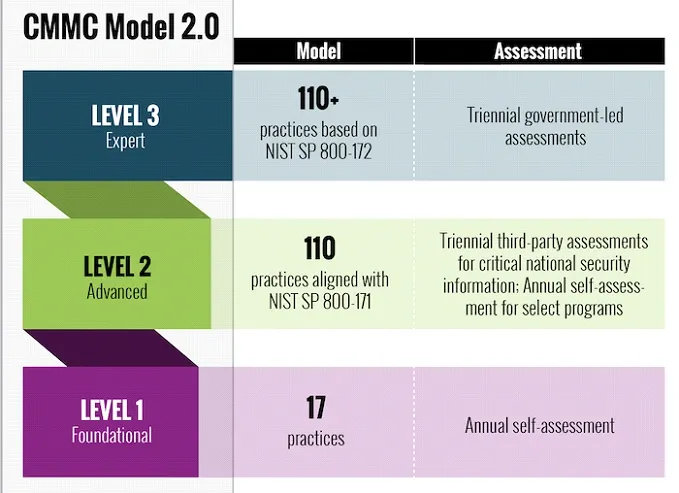
Image Source: Dewpoint
The 14 CMMC control families include Access Control as a vital foundation that protects Controlled Unclassified Information (CUI). Two key principles in this domain can reduce your organization’s attack surface by a lot.
Role-Based Access and Least Privilege
The principle of least privilege is the life-blood of implementing effective access control. Users should only have access levels they need to do their jobs. This approach reduces unauthorized access risks and potential data breaches by a lot.
Role-Based Access Control (RBAC) puts this principle into action. It organizes roles based on job responsibilities and assigns permissions based on these roles. Defense contractors use RBAC to limit user access to necessary information, which supports CMMC requirements AC.1.001 and AC.2.009.
Security functions need special focus within the least privilege framework. These functions include setting up system accounts, choosing events to log, and setting up access authorizations. The core team must restrict privileged accounts, especially system administrator accounts, to specific personnel or roles. This prevents regular users from accessing privileged information.
Portable Storage Device Restrictions
Portable storage devices create much vulnerability in any security setup. CMMC requirement AC.L2-3.1.21 requires limiting their use on external systems.
Organizations can implement this requirement in two main ways:
- Administrative policies that specify approved devices, usage restrictions, and authorized external systems
- Technical configurations that allow devices to work only with systems they can authenticate with
Organizations might ban portable storage devices completely or set specific conditions for their use. These restrictions help prevent data leaks and alleviate malware threats that could harm your internal network.
Note that “external” doesn’t always mean outside your organization. It can refer to systems within your organization that don’t handle CUI or have different access restrictions.
Awareness and Training: Educating Your Workforce
People remain the biggest security weakness in cybersecurity defense. This explains why Awareness and Training stands as a vital CMMC control family. Security training goes beyond a checkbox exercise and serves as a key protective measure for organizations that handle sensitive government information.
Phishing Simulations and Cyber Hygiene
Security awareness programs need to tackle real-life threats. Phishing attacks lead the way as the original attack vector in over 90% of successful cyber intrusions. The defense industrial base faces constant targeting, and one security operations center reported a 300% surge in sophisticated email attacks during the first quarter of 2023.
Phishing simulations give hands-on experience in spotting threats. These exercises monitor whether employees open suspicious emails, click dangerous links, access attachments, enable macros, or enter credentials. The simulations do more than test knowledge – they build “muscle memory” for security reflexes, similar to how physical fitness training develops instinctive responses.
Advanced platforms give immediate feedback after employees complete tests and assign targeted training to those who need help. This method creates measurable improvements in security behavior and reduces successful phishing rates across the organization.
Training Records for Audit Readiness
CMMC Level 2 compliance needs proof that managers, administrators, and users understand security risks linked to their activities. Training records must show that personnel receive instruction matched to their information security duties.
Organizations should focus on boosting employee awareness about requirements while preparing for CMMC audits. This becomes especially important for staff who handle sensitive information directly. Audit documentation proves that CMMC controls work as intended.
Good documentation includes records of role-based training, insider threat awareness sessions, and specialized education on CUI handling. Modern training platforms can generate auditable records of policy reviews, comprehension tests, and employee acknowledgments automatically, which optimizes the compliance process.
Audit and Accountability: Tracking User Actions
Security monitoring works best when you know who accessed what and at the time it happened. The Audit and Accountability domain of CMMC controls forms the foundations of cybersecurity governance. Your systems must capture and protect evidence of user activities, especially when you have Controlled Unclassified Information (CUI).
Log Review Frequency and Retention
Audit logs act as your digital paper trail to investigate security incidents. You must decide which events to capture and focus on actions that might signal unauthorized access or suspicious behavior. The CMMC framework needs you to create and keep system audit logs to enable “monitoring, analysis, investigation, and reporting of unlawful or unauthorized system activity”.
Your organization’s retention guidelines should account for:
- The time gap between a compromise and when you find it (often weeks or months)
- What you need for forensic investigation after incidents
- What government contracts require
CMMC doesn’t tell you exactly how often to review logs, but regular checks are crucial. Security Information and Event Management (SIEM) tools can automate this process and correlate activities to spot risks better. Document these reviews through work logs or change tickets that show how you’ve adjusted logging settings to catch more real threats or cut down false alarms.
Who Has Access to Audit Logs?
Your audit information needs as much protection as the effort spent collecting it. CMMC control AU.L2-3.3.8 requires you to protect “audit information and audit logging tools from unauthorized access, modification, and deletion”. Only people with a legitimate need-to-know should see audit information, whether from direct logs or through audit tools.
To make this work:
- Let only select privileged users manage audit logging functions (AU.L2-3.3.9)
- Keep duties separate so staff can’t hide their mistakes by changing audit records
- Use different accounts for admin work and daily tasks
- Keep stored logs encrypted to maintain confidentiality
Proper audit log access restrictions create accountability in your organization and keep your security monitoring system’s integrity intact.
Configuration Management: Keeping Systems Consistent
Configuration Management in the CMMC framework protects system integrity by implementing security settings in a controlled way. The domain includes five essential controls at Level 2 that help maintain stable systems throughout their development lifecycle.
Secure Baseline Configurations
Secure system operations depend on baseline configurations. Standard security settings for an organization’s systems, including hardware, software, firmware, and documentation, need proper setup and maintenance. These baselines help organizations detect any malicious system modifications by providing a clear reference point.
Organizations can set up effective baseline configurations by:
- Finding all systems that handle Controlled Unclassified Information
- Creating standard security settings for each type of system
- Enforcing these settings with configuration management tools
- Updating baseline configurations regularly
Most organizations use “gold images” that they can deploy on multiple systems. This approach ensures their security stays consistent.
Change Management Documentation
Documentation of configuration changes is the life-blood of good system governance. The system needs tracking, review, approval, and logging of all changes before they go live. This process, known as configuration change control, needs systematic proposals and testing of changes before final approval.
Change management works well with:
- Clear steps to request and approve system changes
- Analysis of security impacts before making changes
- Review boards that evaluate proposed changes
- Detailed logs of activities before and after any modifications
Strong configuration management helps organizations avoid security gaps that could expose CUI to risks or unauthorized access.
Identification and Authentication: Proving Identity
Reliable identification methods are the life-blood of CMMC’s security architecture. They create a vital defense line that protects sensitive information systems with Controlled Unclassified Information (CUI) from unauthorized access.
Biometric and Certificate-Based Authentication
Identity verification has moved past simple passwords to more advanced authentication methods that are harder to break. Biometric authentication checks identity using unique physical or behavioral traits like fingerprints, facial features, or iris scans. These methods are a great way to get advantages over regular password systems because they’re unique to each person, which makes them extremely hard to copy or fake.
Organizations must take these steps to use biometric authentication for CMMC compliance:
- Choose the right technologies that match organizational needs
- Combine biometrics with current authentication systems to create reliable multi-factor authentication (MFA)
- Use encryption and secure storage to protect biometric data
In spite of that, advanced biometrics have their limits. These include false acceptances, privacy issues, and challenges with integration.
Session Timeout and Lockout Policies
Protection against unauthorized access needs strong defenses against brute force attacks and unattended sessions. CMMC requires limits on consecutive failed logon attempts—usually after three failed tries. The system should either keep accounts locked until an administrator unlocks them or automatically unlock them after a set time.
Session timeout policies help reduce the risk from unattended workstations. CMMC needs automatic session termination under specific conditions. Common timeout periods usually range from 10-15 minutes of no activity. These timeouts stop unauthorized access that could happen if users leave their systems unattended.
Organizations can end sessions based on different triggers:
- No activity for a specific time (usually one hour or less)
- Time-of-day limits
- Security violation attempts
- System maintenance needs
Organizations build a strong foundation for their CMMC compliance by using these complete identification and authentication controls.
Incident Response: Reacting to Breaches Quickly
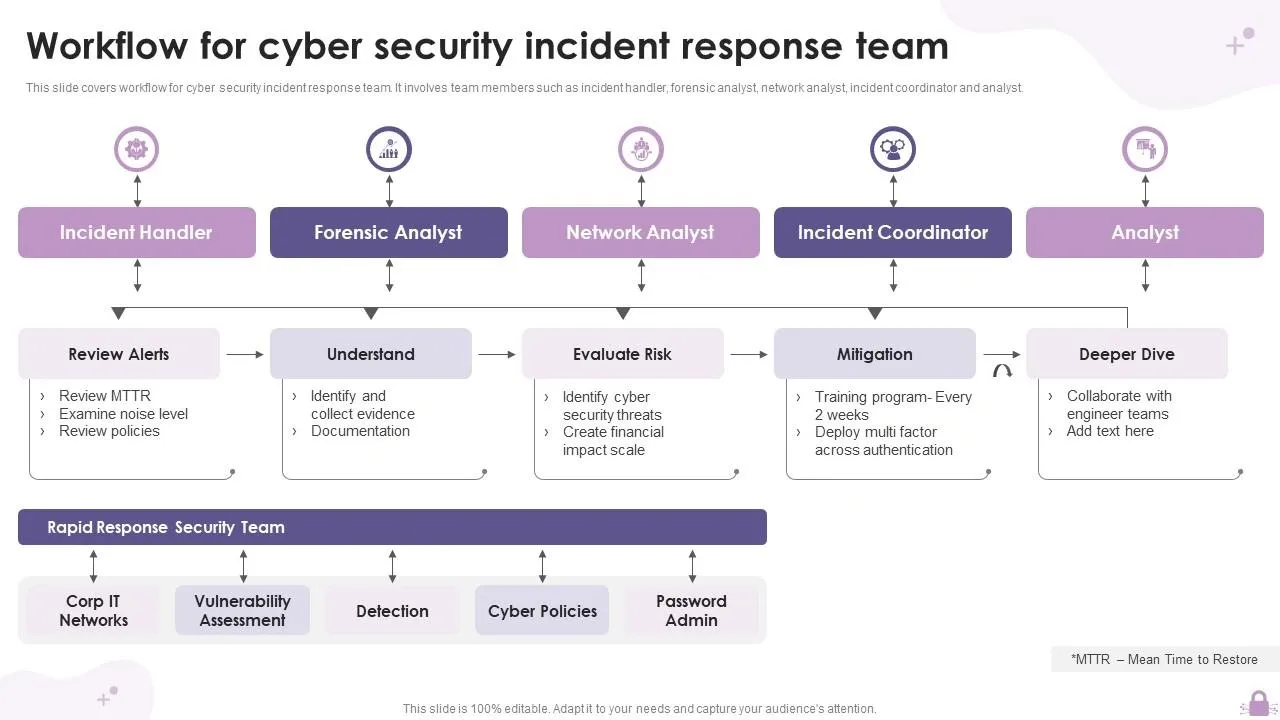
Image Source: SlideTeam
Security incidents trigger the CMMC Incident Response domain’s framework to detect, document, and address potential CUI compromises. This domain includes three critical Level 2 controls that focus on handling, reporting, and testing your response capabilities.
Incident Tracking Systems
A reliable tracking system forms the backbone of operational incident handling. Your system needs to document security events from start to finish. The tracking mechanisms should include:
- Identify contacts both inside and outside your organization
- Establish clear reporting channels (email addresses, phone numbers)
- Implement systematic documentation processes
- Secure evidence properly for potential investigations
CMMC requires organizations to report CUI-related incidents to the Defense Industrial Base Cybersecurity portal within 72 hours. Organizations must keep forensic data for at least 90 days to help DoD conduct follow-up investigations.
Post-Incident Review and Lessons Learned
A comprehensive review must follow every resolved incident. The post-incident analysis answers key questions about what went wrong, which processes failed, and ways to enhance response capabilities.
Organizations can improve their security posture with insights from these reviews. Teams should document the lessons and make changes to strengthen their incident response processes.
Regular testing and simulations help verify that incident response capabilities work under real-life conditions. These proactive measures spot vulnerabilities before actual breaches occur and create a culture of continuous improvement in security operations.
Maintenance: Ensuring Secure System Upkeep
System security needs constant alertness after the original setup. CMMC’s Maintenance domain has six essential controls that show how organizations should manage system upkeep while keeping security intact.
Maintenance Logs and Access Controls
Secure maintenance practices are built on detailed documentation. Organizations need to keep thorough records of maintenance staff, timing, and the work to be done. These logs serve as crucial evidence during CMMC assessments and show that maintenance tasks are “authorized, monitored, and logged to ensure cybersecurity requirements are maintained”.
Supervision becomes crucial when external technicians handle systems with CUI. CMMC control MA.L2-3.7.6 requires staff supervision for maintenance personnel who lack proper access authorization. A ticketing system helps track maintenance requests and approvals, while secure tamper-proof systems store all maintenance logs.
Remote Maintenance Protocols
Remote maintenance sessions create unique security risks. CMMC control MA.L2-3.7.5 requires multi-factor authentication to set up nonlocal maintenance sessions through external networks. These connections must end right after completion.
Remote maintenance security should cover:
- Approval before any nonlocal maintenance work
- Immediate session monitoring
- VPNs or SSH tunnels for encrypted connections
Equipment taken off-site for maintenance needs sanitization to remove CUI first to prevent data exposure. Media with diagnostic tools needs inspection for malicious code before use.
Media Protection: Controlling Data on Devices
Organizations need strong protective measures beyond network security for physical and digital media containing CUI. CMMC Level 2’s Media Protection domain features nine specific controls that secure data on media of all types.
Media Inventory and Labeling
Media protection’s foundations start with proper identification. Organizations must clearly mark all CUI-containing media with appropriate markings and distribution limits. These human-readable security markings help staff quickly spot sensitive information and handle it properly. National Archives and Records Administration (NARA) provides detailed guidelines to label media of different sizes.
A media inventory system works best with:
- Accountability procedures for stored media
- Check-out/check-in processes for media library access
- Physical controls for media containing CUI
Media without clear ownership creates major risks. Organizations must prohibit use of portable storage devices that lack ownership details.
Transport and Storage Procedures
Media security during transport plays a vital role. Organizations must track all CUI-containing media moved outside controlled areas. Only authorized personnel can transport media, and tracking systems prevent loss or tampering.
CMMC requires cryptographic mechanisms to protect CUI confidentiality on digital media during transport, unless other physical safeguards exist. Most organizations use encryption for portable drives and removable media.
Secure storage needs physical control mechanisms. These include locked containers, restricted access areas, and secure filing systems that protect both paper documents and digital media.
Physical Protection: Securing the Premises
Physical security is a basic yet often ignored part of the CMMC controls framework. Organizations need strong physical defenses along with digital ones to protect areas where CUI is stored.
Visitor Logs and Escort Policies
CMMC control PE.L1-3.10.3 requires staff members to escort visitors and monitor their activities. Organizations should give visitors temporary badges and make sure employees accompany them while they’re on site.
Visitor management needs:
- Approval before visitors can enter CUI areas
- Special badges that make visitors easy to spot
- Staff escorts when visitors are in sensitive areas
These steps help stop unauthorized people from viewing, copying, or tampering with CUI.
Physical Access Reviews
Good audit logs of physical access (PE.L1-3.10.4) make everyone who enters the facility accountable. Staff can track entries through paper sign-in sheets or electronic badge readers.
Access logs should be:
- Checked often to spot unusual patterns
- Tested to make sure they work properly
- Kept as long as rules require
- Reviewed during security checks
Physical protection is a vital defense layer. Organizations can set clear boundaries around CUI environments through proper visitor tracking and access logging. These physical measures work with technical safeguards to handle security risks from human activity.
Personnel Security: Vetting and Monitoring Staff
The CMMC framework’s personnel security component focuses on protecting sensitive information systems through human-centered controls.
Security Awareness for Contractors
Security awareness training remains mandatory for both Level 1 and Level 2 in CMMC 2.0. This training ensures employees understand cybersecurity risks and protective measures. Level 1 training focuses on simple practices like spotting phishing attempts and password security. The requirements become more demanding at Level 2 when handling Controlled Unclassified Information (CUI). Staff need regular updates about threats, role-specific training, and must follow documented incident reporting procedures.
Access Revocation Timelines
Access revocation rules after personnel changes have become more strict. Organizations must now revoke system access for terminated employees within just four hours, which is much shorter than the previous 24-hour window. This stricter timeline shows a better understanding of security risks during staff transitions.
Organizations following the CMMC framework must screen individuals before granting access to CUI systems. These systems need protection during employee transitions like terminations and transfers. Most companies implement this through new hire background checks and complete checklists that track access removal steps.
Risk Assessment: Proactively Identifying Threats
Risk management is the foundation of good cybersecurity governance for defense contractors. CMMC compliance needs a well-laid-out, step-by-step way to spot threats before they become real problems.
Annual vs. Quarterly Risk Reviews
Organizations must conduct risk reviews at set times to stay compliant. The debate about how often to do these reviews is ongoing. Annual reviews give a detailed view of the security landscape. Quarterly reviews help adapt to threats faster.
Risk reviews are very different from vulnerability assessments. Vulnerability scans find specific technical weak points, while risk reviews look at how issues could affect mission success. These reviews need to cover several areas:
- Risks that affect the whole organization’s operations
- Problems that could stop mission and business processes
- System risks that might put CUI data at risk
Teams must document all risk review results well. This creates vital evidence for CMMC assessors to review.
Using CMMC Controls Mapping Solutions
Compliance teams don’t deal very well with overlapping frameworks. CMMC takes a lot from NIST 800-171, which comes from NIST 800-53. This makes mapping between these frameworks a vital part of the process.
New tools can map these frameworks automatically. This makes compliance work easier and covers all 110 CMMC Level 2 controls. These tools help teams:
- Find gaps between current security and what’s needed
- Focus on fixing the most important risks first
- Create documents to show they’re ready for assessment
Book your Readiness Meeting to see if your risk review approach meets CMMC requirements.
Security Assessment: Measuring Control Effectiveness
Security control assessments are the foundations of CMMC compliance. These assessments confirm that your cybersecurity measures protect CUI as intended. A full picture uncovers gaps that might stay hidden until exploited.
Assessment Frequency by CMMC Level
Your organization’s CMMC level determines how often assessments happen. Companies at CMMC Level 1 must complete self-assessment annually. Organizations at Levels 2 and 3 need assessment every three years. Annual affirmation of continued compliance remains mandatory whatever your level.
Changes within your assessment scope can void previous certifications and might need earlier reassessment. Notwithstanding that, the DoD has made it clear that “adding or subtracting resources within the existing assessment boundary that follow the existing SSP do not require a new assessment”.
Documenting Assessment Results
Your organization must retain assessment evidence for six years. This timeframe matches the statute of limitations under the False Claims Act. Your organization must ensure artifact availability during this period.
CMMC assessments employ three main methods: documentation examination, personnel interviews, and control testing. Draft documents might contain accurate information, but only finalized materials count as valid evidence.
Book your Readiness Meeting today to review your organization’s assessment readiness and confirm your documentation meets CMMC requirements.
System and Communications Protection: Guarding Data in Motion
Data protection during transmission is a vital CMMC control requirement. The System and Communications Protection domain has several key practices that protect information as it moves through networks.
TLS, HTTPS, and VPN Standards
Secure transmission protocols are the foundations of data protection. CMMC control SC.L2-3.13.8 requires cryptographic mechanisms to stop unauthorized disclosure of CUI during transmission. Organizations that handle CUI need TLS 1.2 or higher with FIPS-approved algorithms for all communications with controlled information. This means they should set up secure email services, HTTPS for web traffic, and encrypted file transfers.
VPNs with strong encryption (AES) add another layer of protection when accessing remotely. NIST SP 800-171 and CMMC 2.0 control 3.13.7 specifically requires organizations to disable split tunneling for VPN connections.
Network Segmentation for CUI
Network division into isolated sections creates vital barriers that stop attackers from moving laterally. This segmentation contains threats to smaller areas and limits how far a breach can spread. A good implementation needs these steps:
- Find where sensitive CUI is stored
- Create clear segments based on data sensitivity
- Use firewalls to control access between segments
Segmentation makes monitoring easier and network performance better by reducing congestion.
System and Information Integrity: Ensuring System Health
System and Information Integrity controls create a vital defensive shield within the CMMC framework. These controls focus on keeping systems healthy through active maintenance and malware protection.
Patch Management Schedules
CMMC control SI.L2-3.14.1 requires organizations to identify, report, and fix system vulnerabilities at the right time. Most organizations use automated patch management systems that rank updates by how severe the risks are.
A vulnerability management program should scan security flaws in applications, operating systems, and network devices regularly. Security teams need to balance requirements with operational needs by using phased deployment strategies:
- Test updates in isolated environments before full implementation
- Schedule maintenance windows to minimize business disruption
- Document remediation actions to stay audit-ready
Many security professionals use the N-1 technique instead of rushing to deploy every update. This approach lets systems stay one version behind the newest release until teams test it really well.
Malware Detection and Response
CMMC Practice SI.L1-211 requires protection from malicious code at specific system locations. Organizations need anti-malware solutions on all endpoints—laptops, desktops, servers, and mobile devices.
Teams must set up these tools to update signatures automatically as new releases become accessible (SI.L1-3.14.4). The system needs both periodic scans and up-to-the-minute protection. Security experts suggest quick daily scans with detailed weekly checks.
Organizations should use behavior-based detection tools that analyze suspicious activities to protect against sophisticated threats. These tools work better than just signature-based methods. A strong malware defense needs multiple protective measures that work together.
Conclusion
CMMC compliance means more than just following regulations. Defense contractors need it to keep their DoD partnerships alive. The CMMC framework rests on 14 key domains. These range from Access Control with its role-based permissions to System and Information Integrity that handles patch management. Each domain tackles specific security issues and helps create a complete shield around sensitive data.
Defense contractors don’t deal very well with implementing these controls. Companies that take a smart approach to CMMC get a real edge over competitors and boost their security at the same time. NIST 800-171 and CMMC work together to show the way forward. This is especially true at Level 2, where the 110 controls match perfectly with current standards.
Some domains affect daily operations more than others. Access Control sets the rules for information access. Incident Response determines your team’s speed in spotting and stopping potential breaches. Your workforce needs proper screening and training to handle CUI, which Personnel Security takes care of.
CMMC certification shows your steadfast dedication to protecting America’s defense information. The DoD sees cybersecurity as non-negotiable in their procurement decisions. Smart organizations see these requirements as investments rather than expenses.
Want to know where you stand with compliance? Book your Readiness Meeting to find out how your organization measures up to CMMC requirements. Our assessment gives you the full picture and practical recommendations that work with your business goals. The certification timeline lets companies plan ahead. Early adopters will definitely have an advantage as CMMC rolls out across the defense industrial base.
CEOs who get these 14 domains set their companies up for lasting success in the defense market. Getting compliant might look complicated. With the right guidance and step-by-step implementation, your organization can earn and keep CMMC certification while building stronger cybersecurity defenses.
Key Takeaways
Understanding CMMC’s 14 control domains is essential for defense contractors to maintain DoD partnerships and protect sensitive government information effectively.
• CMMC compliance is mandatory for DoD contracts – Non-compliance risks $4.6M+ penalties, contract termination, and complete ineligibility for defense work.
• 110 Level 2 controls align perfectly with NIST 800-171 – Organizations implementing NIST standards are simultaneously preparing for CMMC certification.
• Access Control and Incident Response require immediate attention – Implement role-based access with least privilege and 72-hour breach reporting to DoD.
• Personnel security demands 4-hour access revocation – Terminated employees must lose system access within 4 hours, down from previous 24-hour window.
• Physical and digital protections work together – Visitor escorts, audit logs, and encrypted data transmission create comprehensive security layers.
• Early certification creates competitive advantage – First movers gain access to sole-source contracts while late adopters face lengthy reviews.
CMMC represents more than compliance—it’s a strategic business investment that demonstrates commitment to protecting America’s defense information while positioning organizations for continued success in the defense marketplace.
FAQs
Q1. What are the key domains covered in the CMMC framework? The CMMC framework consists of 14 domains, including Access Control, Audit and Accountability, Configuration Management, Incident Response, and System and Communications Protection. These domains cover various aspects of cybersecurity to ensure comprehensive protection of Controlled Unclassified Information (CUI).
Q2. How many controls are required for CMMC Level 2 certification? CMMC Level 2 certification requires implementation of 110 controls. These controls are directly aligned with the requirements outlined in NIST 800-171, making it easier for organizations already compliant with NIST standards to achieve CMMC certification.
Q3. What is the timeframe for revoking system access for terminated employees? Under the latest CMMC requirements, organizations must revoke a terminated employee’s access to sensitive systems within 4 hours of their departure. This is a significant reduction from the previous 24-hour window, reflecting the increased focus on rapid security measures.
Q4. How often do companies need to undergo CMMC assessments? The frequency of CMMC assessments varies by certification level. Organizations at CMMC Level 1 must conduct self-assessments annually, while those at Levels 2 and 3 require third-party assessments every three years. However, annual affirmation of continued compliance is mandatory for all levels.
Q5. What are the potential consequences of non-compliance with CMMC requirements? Non-compliance with CMMC requirements can result in severe consequences, including financial penalties exceeding $4.6 million, contract termination, and ineligibility for future Department of Defense contracts. Additionally, companies may face legal risks under the False Claims Act and potential reputational damage in the defense industry.